Free for everyone. 10 photos included every day. All features unlocked.

What Will You Track?

If you can photograph it, you can track it. Browse ideas below or skip the list — just add any photo and let the AI figure out what to track.
Health & Body

Body Weight

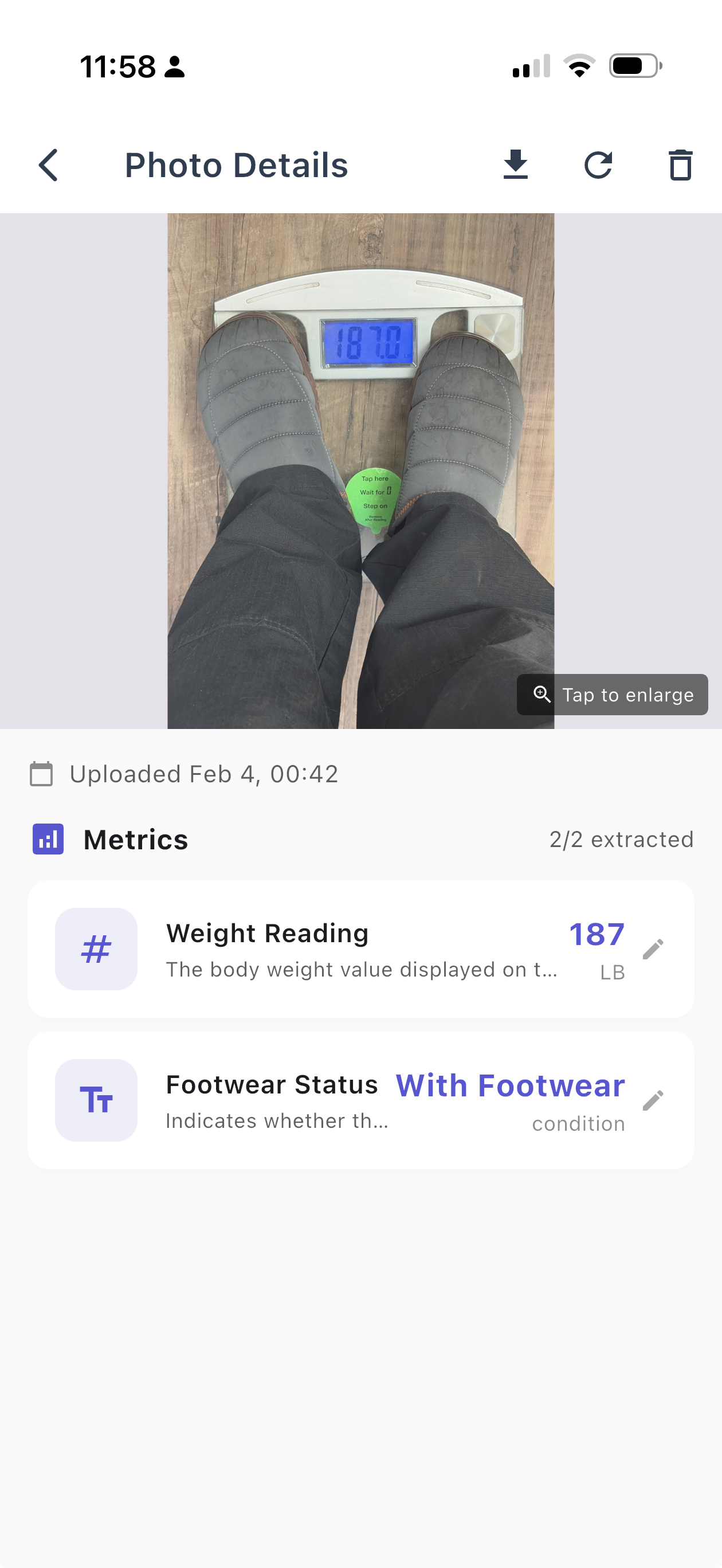
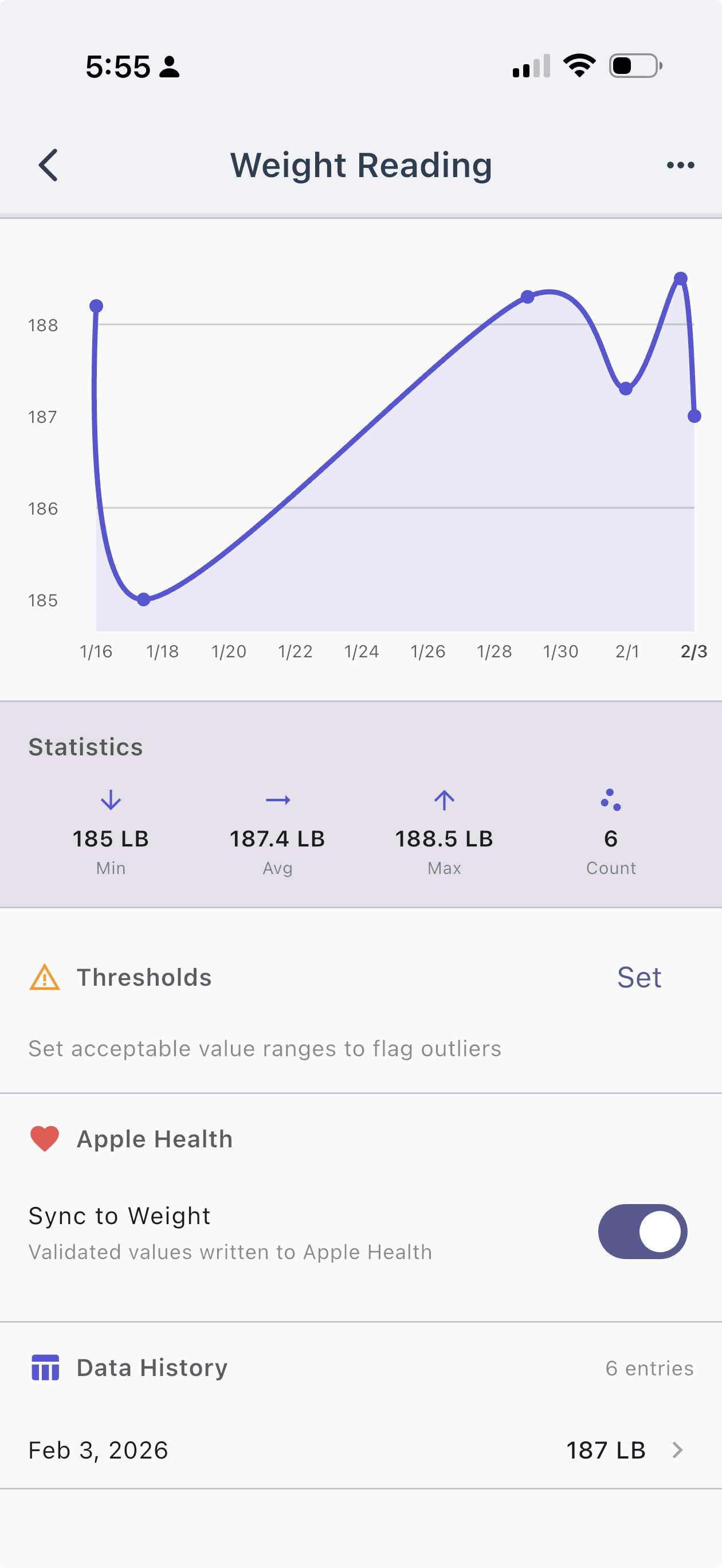
PhotoMetrics extracting weight reading and footwear status from a bathroom scale photo Weight metric detail in PhotoMetrics showing chart, statistics, thresholds, and Apple Health sync toggle

Step on the scale and snap a photo. PhotoMetrics reads the number and charts your weight over time. Works with any digital or analog scale — no Bluetooth or smart scale required. iPhone users can sync validated weights directly to Apple Health, keeping all your health data in one place.
Metrics extracted

  • Weight
  • Date
  • Body fat %
  • BMI

More ideas in this category

  • Apple Health sync (iPhone) — validated weight, blood pressure, blood glucose, and other numeric metrics can sync directly to Apple Health
  • Blood pressure readings — photo your cuff after each reading, track systolic/diastolic over time
  • Blood glucose levels — snap your glucometer or CGM screen, build a log without the proprietary app
  • Thermometer readings — track temperature during illness or basal body temp for fertility
  • Pulse oximeter — capture SpO2 and heart rate from any fingertip device
  • Pill counting — photograph your pill organizer or bottle to track remaining supply and stay ahead of refills
  • Any medical device — if it shows a number on a screen but lacks Bluetooth or an app, PhotoMetrics can read it

Fitness & Sport

Gym Machine Displays

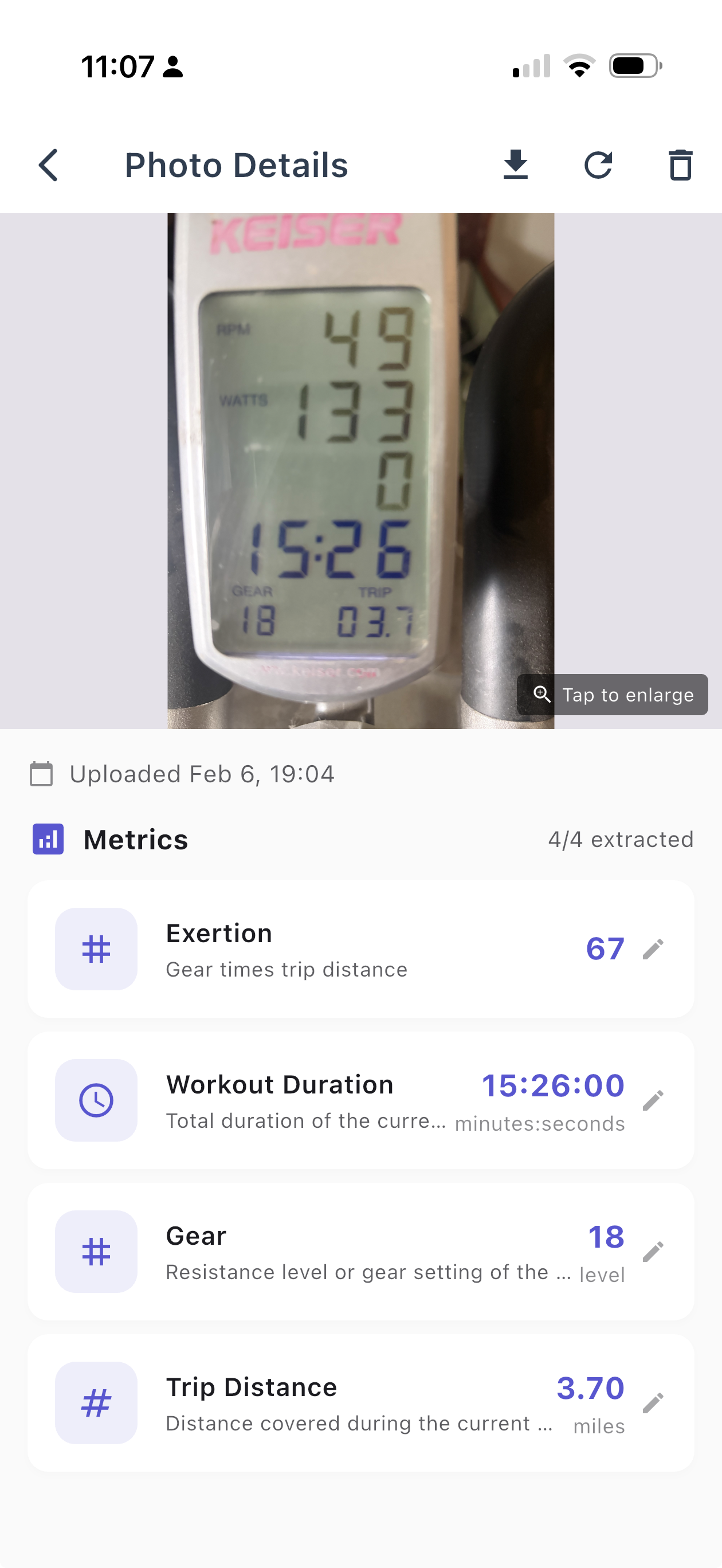
PhotoMetrics extracting workout data from a Keiser bike display - RPM, watts, duration, gear, and trip distance

Photo the screen on the treadmill, rowing machine, or stationary bike when you finish your session. Track distance, calories, heart rate, and pace across workouts without a wearable.

Exertion here is a custom metric — we asked the AI to multiply gear by distance, giving you a single number for overall effort.
Metrics extracted

  • Duration
  • Distance
  • Calories
  • Exertion
  • Pace

More ideas in this category

  • Rep tallies — photo your handwritten tally sheet and let the AI count and summarize your sets and reps. Best of both worlds
  • Barbell plate math — snap the loaded bar and let AI total the weight from the plates. Manually enter the rep count
  • Peloton & connected fitness — screenshot your post-workout summary to track output, cadence, and heart rate without paying for data export
  • Game & match results — scoreboard photos from tennis, basketball, golf, or any sport you play
  • Cycling computer — Wahoo, Garmin, or any head unit screen showing speed, power, and cadence
  • Swim lap timer — pool clock or lap counter display after your swim session

App Screenshots

Amazon Order Tracking

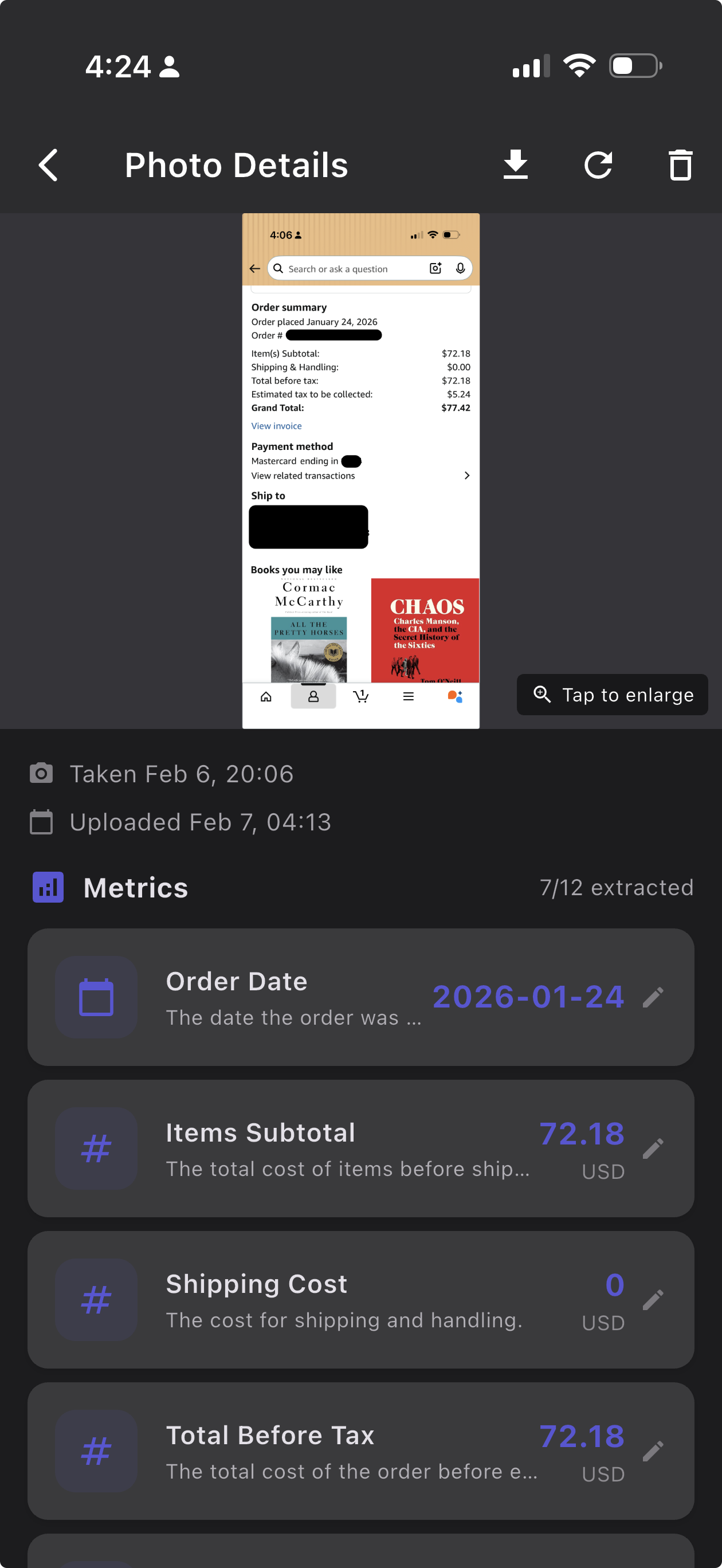
PhotoMetrics extracting order data from an Amazon order summary screenshot - order date, items subtotal, shipping cost, and total before tax

Screenshot your Amazon order summaries as you go. PhotoMetrics extracts the critical details of your orders — building a spending dataset Amazon won’t export for you. Categorize and group orders to see where your money really goes over time.
Metrics extracted

  • Order date
  • Items subtotal
  • Shipping cost
  • Total before tax
  • Tax
  • Grand total

Screen Time Tracking

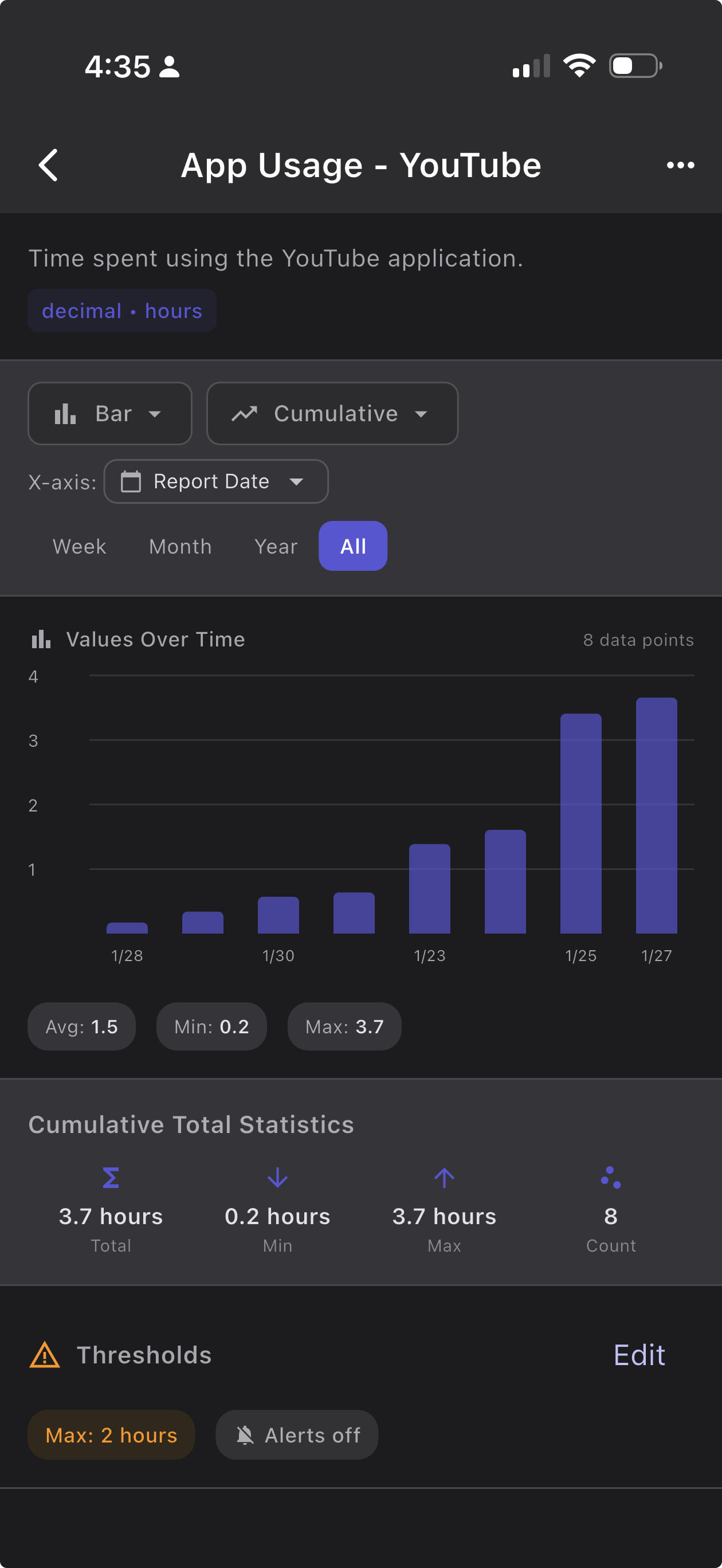
PhotoMetrics extracting screen time data from an iOS Screen Time report - total hours, weekly average, and breakdowns by category PhotoMetrics chart showing YouTube app usage over time with bar chart, cumulative trend, and threshold alert set at 2 hours

Screenshot your iOS or Android screen time report and PhotoMetrics extracts the totals and category breakdowns automatically. Track your digital habits over weeks and months to spot trends your phone’s built-in reports won’t show you.
Metrics extracted

  • Total screen time
  • Weekly average
  • Social category
  • Entertainment category
  • Other category

More ideas in this category

  • Step count / fitness app — snap your daily step summary when apps won’t export, building your own long-term dataset. Combine steps from multiple systems
  • Social media analytics — screenshot follower counts, engagement rates, or creator dashboards to track growth
  • Language learning streaks — screenshot Duolingo, Anki, or any app to log XP, streak days, and lesson counts
  • Game stats & leaderboards — capture in-game scoreboards, rankings, or match summaries to track your improvement
  • Battery health — screenshot your phone or laptop battery health periodically to track degradation over time

Food & Kitchen

Grocery Order Tracking

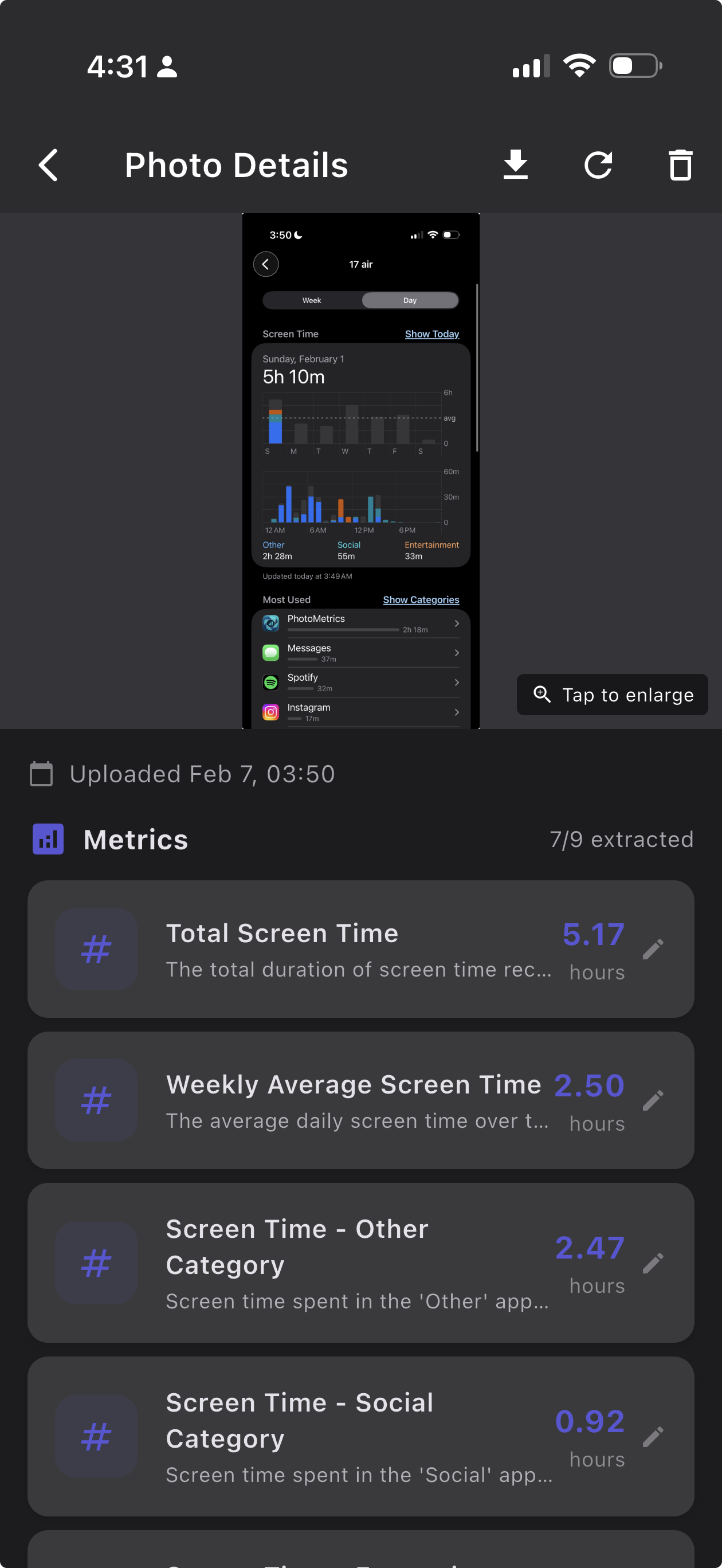
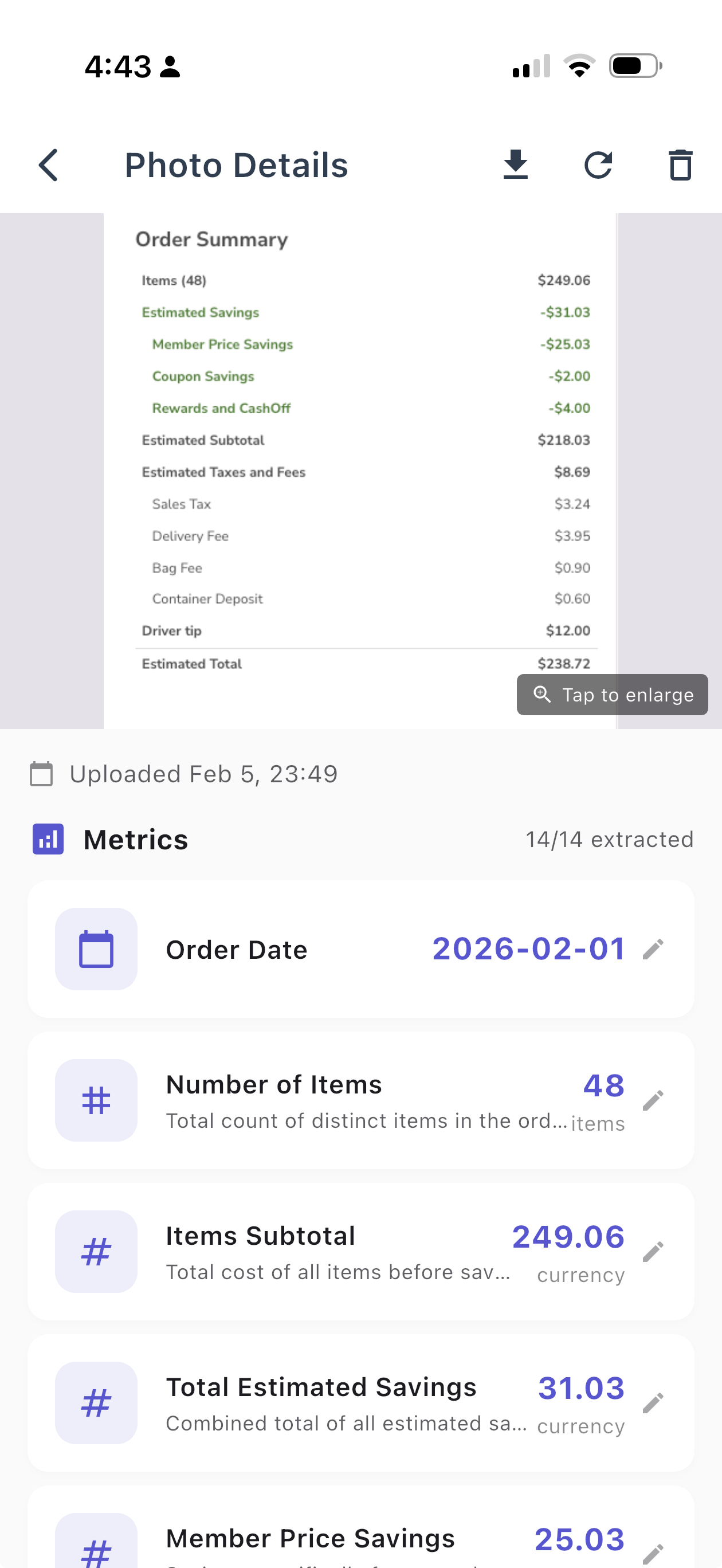
PhotoMetrics extracting order details from a Safeway.com order summary - items, subtotal, savings, taxes, fees, and estimated total

Screenshot your Safeway, Instacart, or any grocery delivery order summary. PhotoMetrics extracts the totals, savings, item counts, and fees — building a spending dataset the store won’t give you. Track how your grocery costs change week to week.
Metrics extracted

  • Order date
  • Number of items
  • Items subtotal
  • Estimated savings
  • Taxes & fees
  • Estimated total

More ideas in this category

  • Sourdough starter — photo the jar at peak rise, track height and timing to dial in your feeding schedule
  • Egg production — daily photo of your egg basket to count and track laying patterns across seasons
  • Homebrew readings — photograph your hydrometer or refractometer to track specific gravity through fermentation
  • MyFitnessPal daily summary — screenshot your daily nutrition totals to build a calorie and macro trend the app won’t export
  • Food delivery spending — screenshot your DoorDash or UberEats order confirmation to track takeout costs over time

Finance & Business

Gas Station Receipts

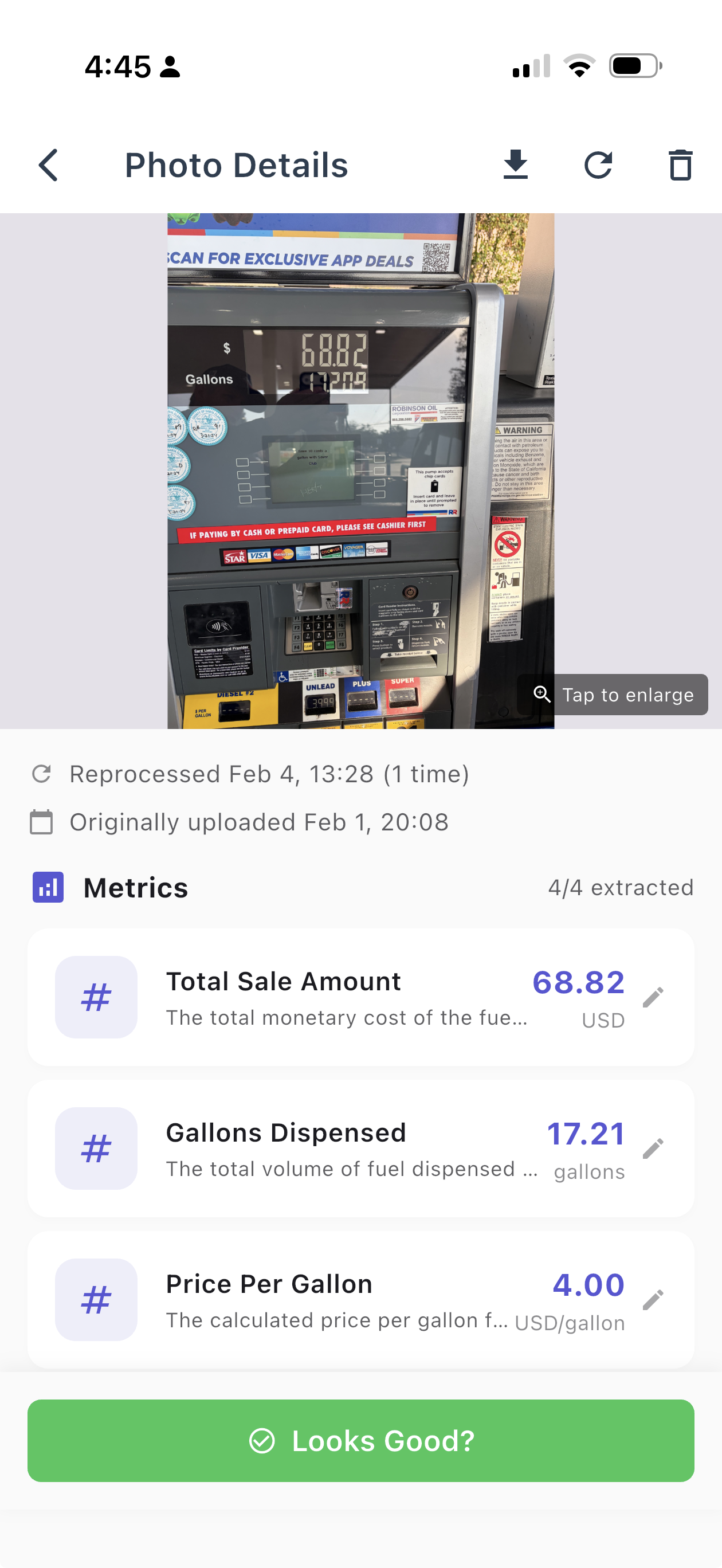
PhotoMetrics extracting fuel purchase data from a gas pump display - total sale amount, gallons dispensed, and price per gallon

Snap the pump display or receipt after every fill-up. Track price per gallon, total cost, and gallons purchased. Pair with odometer photos to track fuel economy over time. Tap “Looks Good” to confirm the numbers are right — your feedback makes the AI smarter over time.

Metrics extracted

  • Total cost
  • Gallons
  • Price per gallon
  • Date

More ideas in this category

  • Investment portfolio — screenshot your brokerage dashboard to track total value, daily change, and allocation over time
  • Utility bills — photo or screenshot each bill to track monthly costs for electric, water, gas, and internet in one place
  • Cash register totals — small business owners can snap end-of-day register readings to track daily revenue
  • Tip jar counting — photograph the cash before depositing to log tip income that’s easy to forget
  • Credit score — screenshot Credit Karma or your bank’s free score monthly to chart the trend lenders actually see
  • Parking meter receipts — track how much you spend on parking each month by snapping the receipt or meter display

Home & Auto

Electricity Meter Readings

Photo your electric meter when you walk by. PhotoMetrics reads the kWh value and tracks your usage over time. Spot seasonal patterns and see the impact of efficiency changes without waiting for your bill.
Metrics extracted

  • kWh reading
  • Date

More ideas in this category

  • Water meter — monthly photos to catch leaks early and track seasonal usage patterns
  • Car odometer — snap the dash at each fill-up or oil change to track mileage and compute MPG
  • Tire pressure — photograph the gauge on each tire to track pressure changes with the seasons
  • EV charging sessions — photo the charger display or screenshot the app to track kWh, cost, and charge time per session
  • Pool chemistry — snap test strip results to track chlorine, pH, and alkalinity across the swim season
  • Solar panel output — photo your older inverter display to track daily generation and spot performance drops

Hobbies & Projects

Fishing Log (Dark Mode)

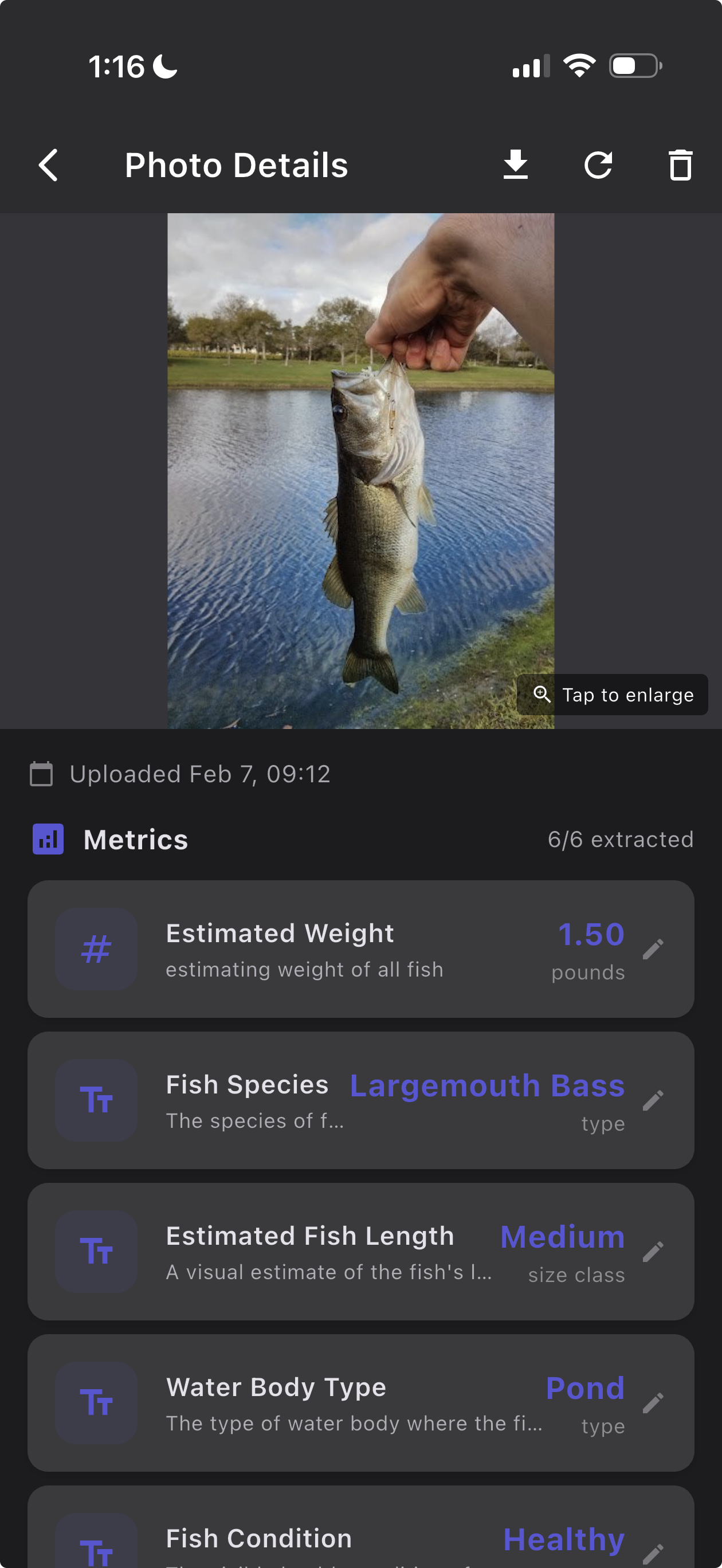
PhotoMetrics extracting fishing data from a catch photo - estimated weight, fish species, length class, water body type, and fish condition

Snap a photo of your catch and PhotoMetrics identifies the species, estimates the weight and length, and logs the water body type and condition — no scale required. Build a fishing journal across the season to track your best spots and biggest catches, with photographic reminders.

Metrics extracted

  • Estimated weight
  • Fish species
  • Fish length
  • Water body type
  • Fish condition

More ideas in this category

  • Aquarium water tests — photo your test kit results to track pH, ammonia, nitrite, and nitrate levels and keep your tank stable
  • Soil testing — photograph soil test kits to track pH, nitrogen, and moisture levels across your garden beds
  • Board game scores — snap the final scoreboard to build win/loss records and track improvement across game nights
  • Plant growth — weekly photos next to a ruler to track height, leaf count, and overall progress of your seedlings
  • Chess rating — screenshot your Chess.com or Lichess profile to chart your ELO rating climb over weeks and months
  • Music practice — screenshot Yousician, Simply Piano, or your metronome app to track BPM, accuracy, and session length

Kids & Family

Baby Weight at Checkups

Photo the scale at each pediatric visit. PhotoMetrics extracts the weight and builds a growth curve automatically. No more scribbling numbers on paper or trying to remember what the doctor said.

Metrics extracted

  • Weight
  • Date

More ideas in this category

  • Kids’ height marks — photo the doorframe growth chart to digitize height measurements and track growth spurts
  • School grades & report cards — snap report cards or graded assignments to track academic progress by subject
  • Allowance savings — photo the piggy bank or cash jar balance to help kids track savings growing over time
  • Baby bottle amounts — photo the bottle markings to track feeding volumes and schedules throughout the day
  • Reading progress — screenshot your child’s Kindle or Epic! reading app to track books completed, pages read, and time spent
  • Screen time limits — screenshot the weekly parental controls report (Screen Time, Family Link) to track whether gaming hours are trending up or down. Implement honor system screentime reporting to encourage taking ownership of their screentime.

See Something You'd Track?

Pick any idea above — or skip the list entirely. Add any photo and the AI will suggest what to track.

Open PhotoMetrics

Tracking something we haven't listed? We'd love to hear about it — tell us and we'll add it.